

Here’s the update: Copilot Studio agent flows have a two-minute limit. Any flow using When an agent calls a flow or When an app calls a flow has to respond within that window, or the calling agent gets nothing back and your automation just doesn’t respond. Microsoft’s fix is called express mode. The roadmap item covering it (ID 566999) got refreshed on July 10, 2026, with GA now pushed to November 2026, and it’s still labeled preview in the docs.
I built a flow, hit the timeout myself, and went digging. Here’s what I found.
The finding: it works, for the right flow
Express mode routes your flow through a leaner execution path instead of the standard pipeline. Microsoft’s docs show a before-and-after comparison, and the speedup held up when I tried it myself. At least for the flows it’s built for.
That’s the part that matters more than I expected. Express mode is meant for flows with a lot of logic and branching but not much data moving through them. I pointed it at a flow pulling a big chunk of rows from a SharePoint list, and it slowed down. I pointed it at a flow that’s mostly condition checks and one AI Builder call, and it worked fine.
The setup
Turning it on is the easy part:
Your flow needs the When an agent calls a flow or When an app calls a flow trigger.
It needs a Respond to agent or Respond to app action.
It has to have a Copilot Studio plan attached.
Your Power Automate environment needs to be on the newer supported architecture, which Microsoft rolls out on its own schedule. You can’t request it early.
If all of that lines up, go to Flows, pick your flow, open Details on the Overview page, hit Edit, and flip the Express mode toggle at the bottom. Or flip it right from the trigger card while you’re building the flow. No extra cost either way.
The catches
This is the part worth reading before you turn this on in production. Some of it I ran into myself, some of it I only found by checking the docs after something broke.
The clock doesn’t stop. Express mode improves your odds of finishing in two minutes. It doesn’t remove the two-minute limit itself.
There’s an action ceiling. I noticed a bigger flow running slower and looked into why. The docs put the limit around 100 actions per run, and loop iterations each count as one. So an Apply to each over 100 items uses up that budget on its own. There’s also a character cap on variables, around 1,024, which I only found out because a longer string I was building got cut off partway through.
Connector responses have a size limit. The docs list it at 64 KB. Send back a large JSON payload or a file reference, and express mode won’t handle it, which is probably why my SharePoint test flow struggled.
Delay and webhook actions aren’t allowed. The flow won’t even save with express mode on if either is in there.
Testing takes longer. The designer’s automatic test feature relies on flow resubmit, which doesn’t work for agent- or app-triggered flows. Every test run has to be done manually, start to finish.
Loops can fail silently. If a connector response inside a loop goes over the size limit, that iteration just doesn’t show up in Run details. No error, nothing flagged, it’s just missing. I only caught this because I was counting iterations by hand. Worth testing in a dev environment first before you rely on it anywhere important.
Try it yourself
Here’s roughly what I did:
Built a small agent flow: When an agent calls a flow trigger, three or four logic-only steps (a condition, a variable set, a Compose action), then Respond to agent.
Called it from a test agent a handful of times and noted the response time.
Went to Flows > [flow] > Overview > Details > Edit, turned on Express mode, republished.
Called it the same number of times again and compared.
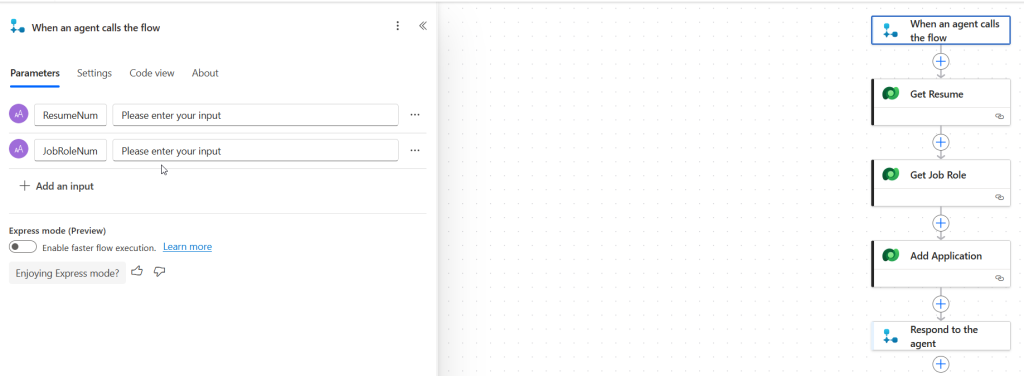
No toggle anywhere? Your environment probably hasn’t been moved to the new architecture yet. That’s on Microsoft’s timeline, not yours.
What I’m watching next
The GA date has already slipped once, from an earlier May 2026 target to November CY2026, according to the roadmap update. That suggests Microsoft is still running into issues at scale, not just polishing documentation. If you want to try express mode, test it on a flow that’s actually failing timeouts today, not a toy example, and keep a non-express version around as a fallback while this is still preview. I’ll check back on that roadmap entry to see if November holds.
