

Understanding the data platform behind Power Platform.
If you build more than a few simple solutions in Power Platform, you will quickly come across Microsoft Dataverse.
At first, it can seem like just another Microsoft product to learn.
It isn’t.
Dataverse is where your business data is stored. You can think of it as the database behind many Power Platform solutions.
Instead of storing information in separate spreadsheets or lists,
Dataverse gives you one place to keep your data organised, secure and connected.
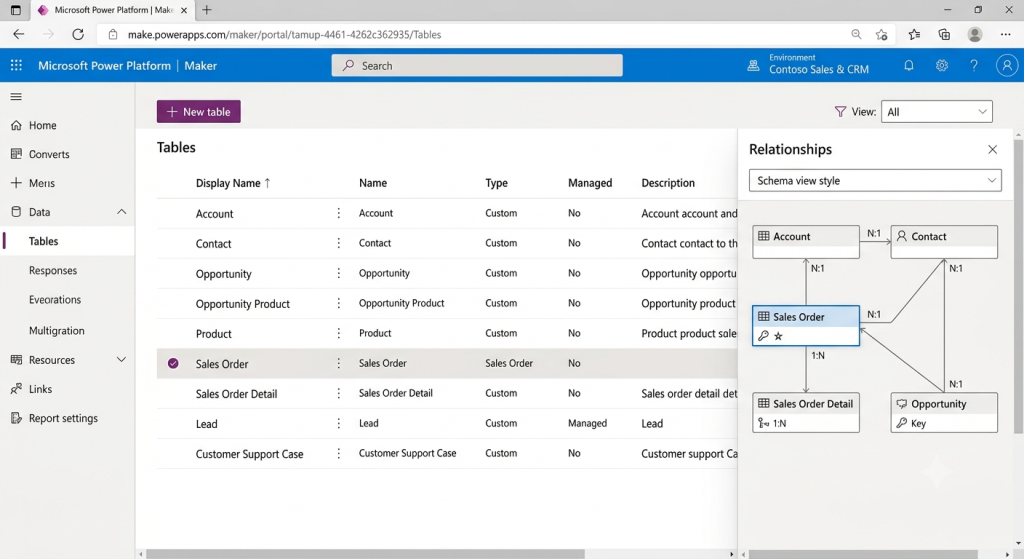
Most business solutions need more than a single list of information.
Imagine you’re building a leave request solution.
You might have:
- Employees
- Leave Requests
- Managers
- Approval statuses
- Departments
These are all different types of information, but they are related to each other.
Dataverse allows you to create those relationships, making it much easier to build business applications that grow over time.
How Dataverse fits into Power Platform
One of the biggest advantages of Dataverse is that it works across the entire Power Platform.
- A Power App can read and update the data.
- Power Automate can trigger when something changes or update records automatically.
- Power BI can create reports using the same information.
- Copilot Studio can answer questions or perform actions using that data.
- Power Pages can securely expose selected information to customers, partners or suppliers.
Instead of every tool having its own copy of the data, they all work with the same source. That is what makes Power Platform feel like one connected platform instead of several separate products.
Built with security in mind.
As your solution grows, security becomes more important.
Not everyone should be able to see or edit everything.
Dataverse allows you to control who can view, create, update or delete information. You can give different permissions to different users, teams or departments, helping to keep business data secure.
A simple example
Imagine you build an app for employees to request leave.
- The employee submits a request through a Power App.
- The request is stored in Dataverse.
- Power Automate sends it to the employee’s manager for approval.
- The manager approves the request.
- The status is updated automatically.
- Power BI shows how many leave requests have been submitted this month.
- If needed, Power Pages could allow external contractors to submit requests through a secure website.
All of these tools are working with the same data stored in Dataverse.
Do you always need Dataverse?
No.
If you are building a small solution with simple requirements, a SharePoint list may be enough. But as your solution becomes more complex, involves multiple related tables or requires stronger security, Dataverse is usually the better choice.
In short
- Dataverse stores the business data behind many Power Platform solutions.
- It keeps information organised using tables and relationships.
- It works seamlessly with Power Apps, Power Automate, Power BI, Copilot Studio and Power Pages.
- It provides security and scalability as your solutions grow.
